Introduction
|
Important
|
In a production environment do not put configuration credentials or sensitive information in configuration files but pass them to the services using environment variables. Passing credentials amd sensitive information as environment variables to services on startup is a secure and flexible way to inject sensitive configuration properties without hard-coding values. This approach simplifies the management of different environments and sensitive data, such as DB or API keys or passwords, ensuring they are accessible only where needed and easily modifiable. |
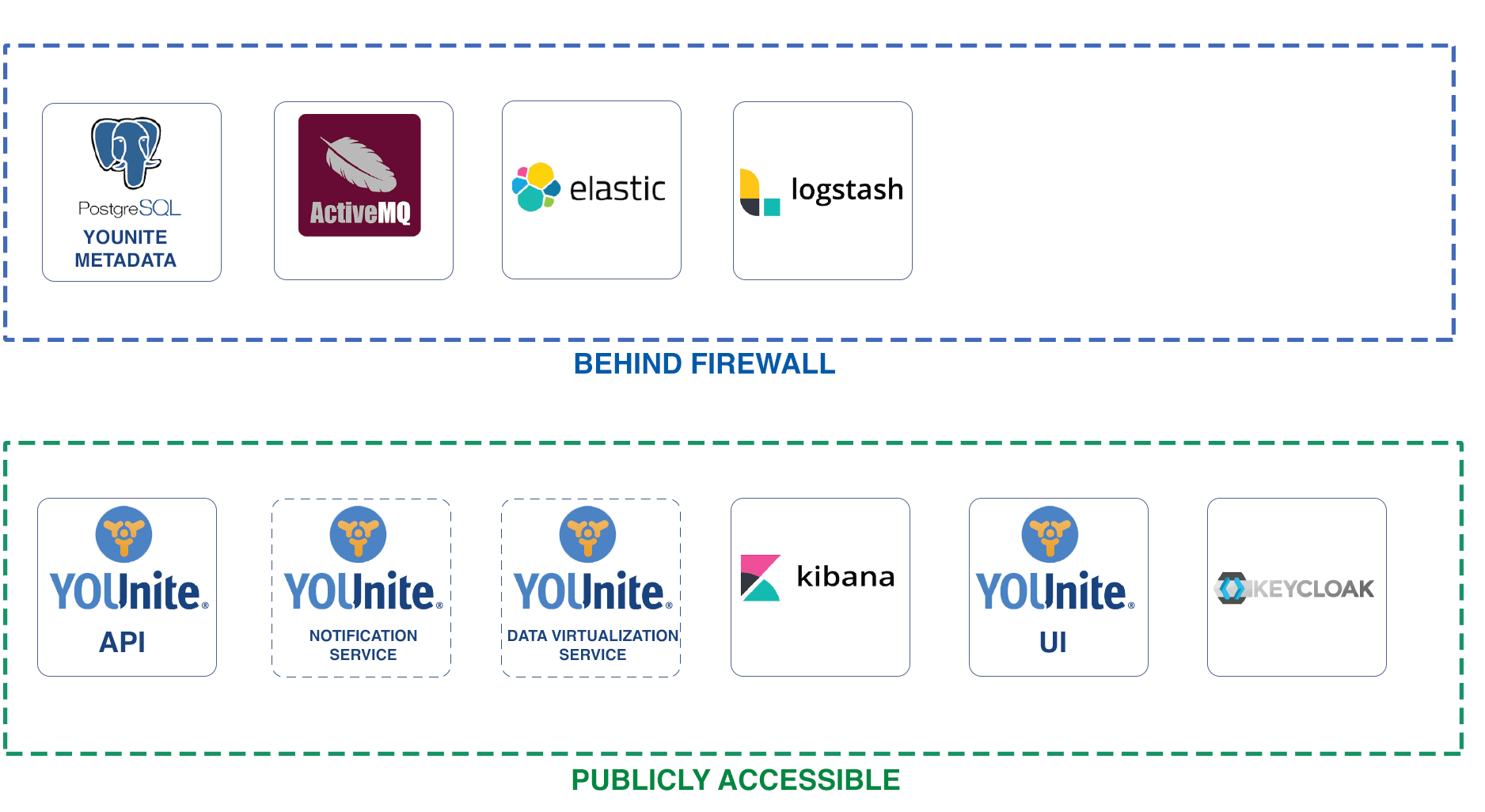
Several services comprise to make up YOUnite:
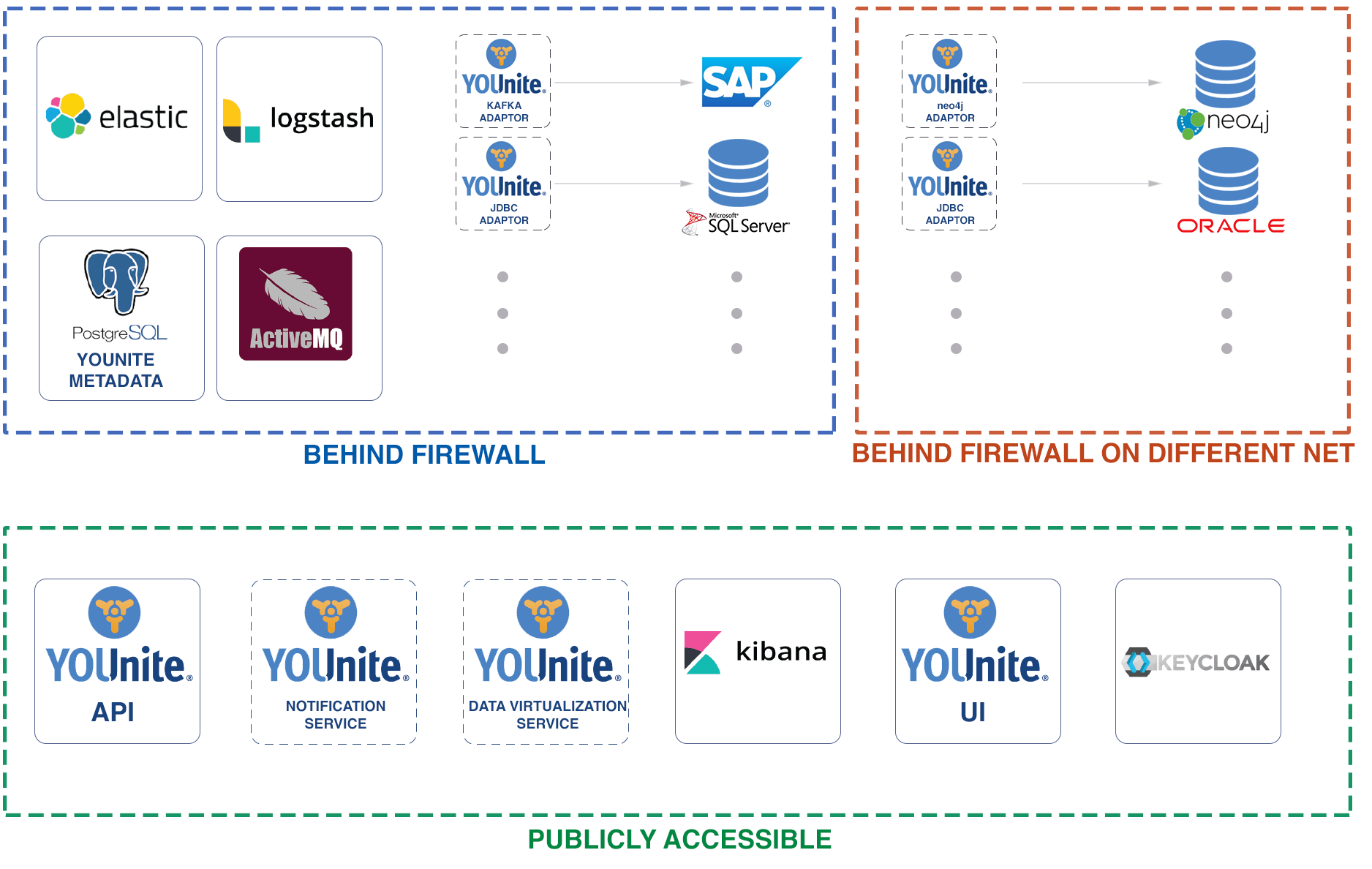
Adaptors connect source systems (e.g. databases) to the API service over the ActiveMQ message bus:
Configuration variables for these YOUnite services are outlined here.
SSO/ID Provider & OAuth with Keycloak
|
Note
|
Keycloak is used as a reference implementation since deployments generally will use the organization’s ID provider for login authentication service and not the Keycloak services supplied by YOUnite. |
For more see Configuring SSO and OAuth with Keycloak.
Keycloak Configuration Variables
| Property | Description | Default | Example |
|---|---|---|---|
KEYCLOAK_USER |
Realm master username |
None |
admin |
KEYCLOAK_PASSWORD |
Realm master password |
None |
admin |
REDIRECT_URIS |
Whitelist of redirect URIs (e.g. API, UI and Notification services) |
None |
"http://local.younite.org/*", "http://local.younite.org:8080/*", "http://local.younite.org:5601/*" |
YOUNITE_CLIENT_SECRET |
The client secret to assign to the |
None |
dcc766a6-de22-452e-9961-15db0cb4a5b6 |
NOTIFICATIONS_CLIENT_SECRET |
The client secret to assign to the |
None |
8da84bfb-0956-482b-8703-3f7210480aed |
TOKEN_LIFESPAN_SECONDS |
Token lifespan in seconds. |
24 hours (86,400 seconds) |
86400 |
DB_VENDOR |
The database vendor used. The YOUnite implementation uses h2. This value should not be changed. |
None |
h2 |
AMQ Message Bus
For more see Message Bus Service.
The only configuration required for the message bus is the username and password of the administrator which are used by YOUnite’s services to communicate with the message bus. There is also an optional configuration option for extra arguments to pass to the JVM running the message bus.
| Property | Description | Default | Example |
|---|---|---|---|
ARTEMIS_USER |
AMQ admin username for console access |
admin |
artemis |
ARTEMIS_PASSWORD |
AMQ admin password |
admin |
artemis |
JAVA_EXTRA_ARGS |
Optional Java arguments to pass to AMQ - normally none should be required. |
None |
-Xms512m -Xmx512m |
YOUnite Service (API)
For more see YOUnite Service Configuration (API).
YOUnite Service’s SSO Configuration Variables
Open ID Connection information, required for authentication.
| Property | Description | Default | Example |
|---|---|---|---|
YOUNITE_API_URL |
URL to the public endpoint for the YOUnite API. Required for a redirect after authentication is completed. |
None |
|
OIDC_DISCOVERY_DOCUMENT_URL |
The URL of the discovery document with Open ID Configuration. |
None |
http://local.younite.org:8800/auth/realms/younite/.well-known/openid-configuration |
OIDC_CLIENT_ID |
Client ID. If using the default keycloak server, the value will be |
None |
younite |
OIDC_CLIENT_SECRET |
Client secret. If using the default keycloak server, the value will be the same as |
None |
8da84bfb-0956-482b-8703-3f7210480aed |
OIDC_SCOPE |
Scope to pass to the auth server. must include "openid", and typically the sso attribute we need, ie "openid email". |
None |
openid email |
OIDC_SSO_ATTRIBUTE |
Attribute(s) to map to SSO ID in the system. the default value is "email,clientId". the inclusion of clientId ensures that a client (such as the Notifications Service) can be authenticated as it may not have an email. |
None |
email,clientId |
OIDC_SUCCESSFUL_LOGIN_URL |
URL to send the user to when they successfully authenticate (such as the UI dashboard) |
None |
YOUnite Service Configuration Variables (API)
#
# Internationalization settings
#
server.lang=en_us

#
# PostgreSQL database configuration
# regarding pool size, see:
#   https://github.com/brettwooldridge/HikariCP/wiki/About-Pool-Sizing
# a size of 10 is likely plenty for an instance running on a 4 core VM.
#
spring.datasource.driverClassName=org.postgresql.Driver
spring.datasource.url=jdbc:postgresql://localhost:5432/younite
spring.datasource.username=younite
spring.datasource.password=younite
spring.datasource.hikari.maximum-pool-size=10
spring.datasource.continue-on-error=true
spring.jpa.database-platform=org.hibernate.dialect.PostgreSQLDialect


#
# Flyway configuration and placeholders
#
spring.flyway.out-of-order=true
spring.flyway.baseline-on-migrate=true
spring.flyway.placeholder-replacement=true
spring.flyway.placeholders.secret.mdmadmin=no-longer-in-use
spring.flyway.placeholders.secret.dgs=no-longer-in-use
spring.flyway.placeholders.secret.resourceServer=no-longer-in-use
spring.flyway.placeholders.secret.notificationService=no-longer-in-use


# HTTP encoding (HttpEncodingProperties)
spring.http.encoding.charset=UTF-8
spring.http.encoding.enabled=true
spring.http.encoding.force=true

# Max file / request sizes for multipart uploads - 10MB by default
spring.servlet.multipart.max-file-size=10MB
spring.servlet.multipart.max-request-size=10MB

#
# Elastic / Logstash config
#
logging.logstash.enabled=true
logging.elastic.enabled=true
logging.service.name=YOUnite Server
logging.logstash.host=localhost
logging.logstash.port=4560
#optional SSL config for logastsh (if trust store is not specified,
# default is used)
#logging.logstash.enable.ssl=true
#logging.logstash.truststore.location=/truststore.jks
#logging.logstash.truststore.password=password

# turn off the health indicator for elastic
management.health.elasticsearch.enabled=false


# Actuator endpoints, like /health, keep them at root level.
management.endpoints.web.base-path=/

# Setting for notifications, data virutalization
notifications.enabled=false
data.virtualization.enabled=false

#
# Managed Role UUIDs
# These are automatically loaded into the database with these UUIDs,
# however, if for any reason they were to be changed, the UUIDs would
# need to be updated here.
#
root.admin.role.uuid=6e3f41af-0900-4f4d-b3cd-ecfa523bfae4
dgs.role.uuid=74e9b1d4-f523-4cea-a263-8c8e24b44348
zone.admin.role.uuid=2cbe3da0-4caf-49f5-b62c-b3b37f00aeec
zone.data.steward.role.uuid=56cb3bf0-1796-4ece-b7b3-1ca52316f521


#
# OAuth2 configuration
#

#
# Open ID Connection information, required for authentication.
#
# younite.api.url             = URL to the public endpoint for the YOUnite
#                               Server API. Required for a redirect after
#                               authentication is completed.
# oidc.discovery.document.url = the URL of the discovery document with Open
#                               ID Configuration
# oidc.client.id              = Client ID
# oidc.client.secret          = Client Secret
# oidc.scope                  = Scope to pass to the auth server. must include
#                               "openid", and typically the sso attribute we need,
#                               ie "openid email".
# oidc.sso.attribute          = Attribute(s) to map to SSO ID in the system. The
#                               default value is "email,clientId". The inclusion
#                               of clientId ensures that a client (such as the
#                               Notifications Service) can be authenticated as it
#                               may not have an email.
# oidc.successful.login.url   = URL to send the user to when they successfully
#                               authenticate (such as the UI dashboard)

#default values
younite.api.url=http://localhost:8080/api
oidc.discovery.document.url=http://localhost:8800/.well-known/openid-configuration
oidc.client.id=client-id
oidc.client.secret=client-secret
oidc.successful.login.url=http://localhost/dashboard
oidc.scope=openid email
oidc.sso.attribute=email,clientId

# Example Open ID Connect config w/ Google
#younite.api.url=http://localhost:8080/api
#oidc.discovery.document.url=https://accounts.google.com/.well-known/openid-configuration
#oidc.client.id=948315574471-8ord9c3cfij75v10c5bst1llotmrn9e7.apps.googleusercontent.com
#oidc.client.secret=hqgrqUccItDHPM_BrGSk61bV
#oidc.successful.login.url=http://localhost/dashboard
#oidc.scope=openid email
#oidc.sso.attribute=email

# Token expiration in minutes 1440 = 24 hours
security.access.token.validity.minutes=1440

ultimate.root.zone.uuid=6c5a754b-6ce0-4871-8dec-d39e255eccc3

#
# optional configuration for the data queue listener
#
# enable performance stats - will be displayed as INFO messages periodically.
# the default value is false.
data.queue.listener.enable.stats=false
# if performance stats are enabled, the frequency in seconds they should be
# displayed (or -1 for every request)
data.queue.stats.frequency=30

# URL, username, password of the message bus
message.bus.url=tcp://localhost:61616
message.bus.username=artemis
message.bus.password=artemis

# number of message bus sessions to cache. the default value is 10.
# this mostly applies to outgoing messages as incoming messages are handled
# by persistent message consumers (though they may increase / decrease per
# demand). For efficiency, the value should be
# message.bus.data.queue.concurrency or larger, otherwise at full concurrency,
# session caching will not be sufficient for demand and new sessions will
# be created frequently.
message.bus.session.cache.size=10

# send messages asynchronously? default is false.
# this may increase throughput but lead to data loss if the connection to the
# message bus is interrupted.
message.bus.send.async=false

# the name of the router's connection to the message bus. the value must be
# unique!!  if not specified, younite-api-(random UUID) will be used.
#message.bus.client.id=

# concurrency levels for the various message bus queue listeners. values can
# be specified as a single value or a range. if a single value is used, that i
# indicates the maximum, with a minimum of 1.
# NOTE: specifying a range for message.bus.data.queue.concurrency is disabled
# as it may cause unpredictable results in relation to message grouping via
# JMSXGroupID. if a range is specified, the maximum value is used.
message.bus.data.queue.concurrency=5
message.bus.ops.queue.concurrency=1-5
message.bus.link.queue.concurrency=1-5
message.bus.adaptor.log.queue.concurrency=1-5

#
# Require verification from the message bus of the adaptor's UUID?
#
# When true (the default), JMS messages are validated by checking the
# JMSXUserID property, which must be set to the username of the authenticated
# user by the message bus. In Artemis, this is enabled by setting the
# populate-validated-user setting in broxer.xml to true. Another option in
# Artemis is to send this as a parameter to the JVM
# ie -Dbrokerconfig.populateValidatedUser=true.
#
# It is strongly recommended not to set this to false as that would enable any
# authenticated user with access to a queue to spoof another adaptor's uuid.
#
message.bus.verify.adaptor.uuid=true

# ActiveMQ Queue management via Jolokia REST endpoints
# Username/password default to the ones used to connect to the bus
active.mq.api.uri=http://localhost:8161/console/jolokia/
active.mq.api.username=${message.bus.username}
active.mq.api.password=${message.bus.password}
active.mq.api.broker.name=0.0.0.0

# cookie management - domain
#cookie.domain=.domain.com

#
# ACL caching is enabled by default. The following can be used to disable and
# tune ACL caching. For very large numbers of ACLs performance may not be
# improved by caching or memory consumption could be too costly.
#
# Options:
# - acl.cache.disable = enable/disable ACL cache
# - acl.cache.maximum.size = maximum size of the ACL cache (each entry is a
#   list of routes for an action for a domain version from a source adaptor)
# - acl.cache.maximum.route.size = maximum number of ACLs to load from the DB
#   before deciding this ACL is too complex to cache
# - acl.cache.maximum.dr.size = maximum number of DR UUIDs to load from the
#   DB before deciding this ACL is too complex to cache
#
# In the event that a route is "too complex" to cache, all events against that
# route will go directly against the database instead. This can be useful
# particularly for a rule that has a lot of DR UUIDs to force that route to
# query the database but still allow others to be cached that are less complex.
#
# defaults:
#acl.cache.disable=false
#acl.cache.maximum.size=10000
#acl.cache.maximum.route.size=5000
#acl.cache.maximum.dr.size=100
Data Virtualization Service
Logging
For more see Logging and Logging Configuration.
This is not a ultimate guide for Elastic configuration. More can be found at the Elastic Website.
Elastic Configuration Variables
| Property | Description | Default | Example |
|---|---|---|---|
discovery.type |
Use this when a single elastic is running i.e. not running as a cluster. |
None |
single-node |
bootstrap.memory_lock |
If set to True, disables swapping (a long with the memlock settings in docker-compose.yml file). |
None |
True |
OPENSEARCH_JAVA_OPTS |
Java options to pass to Elastic. Normally not required. |
None |
-Xms512m -Xmx512m |
OPENSEARCH_PASSWORD |
Elastic search password |
None |
admin |
KIBANASERVER_PASSWORD |
Kibana password (see Kibana configuration) |
None |
kibanaserver |
LOGSTASH_PASSWORD |
Logstash password (see Logstash configuration) |
None |
logstash |
Kibana Configuration Variables
| Property | Description | Default | Example |
|---|---|---|---|
OPENSEARCH_HOSTS |
URL of the Elastic service (if deployed as a cluster, list the complete set of Elastic servers). |
None |
|
OPENSEARCH_URL |
URL of the Elastic service. |
None |
|
OPENSEARCH_USERNAME |
Kibana dashboard user used to access Elastic. |
None |
kibanaserver |
OPENSEARCH_PASSWORD |
Kibana dashboard user’s password used to access Elastic. |
None |
kibanaserver |
Logstash Configuration Variables
| Property | Description | Default | Example |
|---|---|---|---|
ELASTIC_USER |
Elastic username (see Elastic configuration) |
None |
opensearch |
ELASTIC_PASSWORD |
Elastic user’s password (see Elastic configuration) |
None |
admin |
ELASTIC_HOST |
URL of the elastic service. |
None |
|
LS_JAVA_OPTS= |
Java options to pass to logstash. |
None |
-Dlogging.level.com.younite=INFO |
Notification Service
User Interface (UI)
For more see YOUnite UI Configuration.
Configuration Variables
| Property | Description | Default | Example |
|---|---|---|---|
API_ENDPOINT |
YOUnite server API request endpoint |
None |
|
DVS_API_ENDPOINT |
YOUnite Data Virtualization service endpoint |
None |
|
KIBANA_URL |
Logging service API endpoint |
None |
|
SSO_TYPE |
Set to O for the default single-sign-on service Open ID. Contact your system integrator for other options. |
None |
O |
NOTIFICATIONS_CSRF_URL |
URI to retrieve a cross-site request forgery (CSRF) token from. Typically, this is the /csrf endpoint of the YOUnite Notification Service. |
None |
|
NOTIFICATIONS_STOMP_URL |
URI to register for stomp notifications - this typically is the /ws endpoint of the YOUnite Notification Service. |
None |
UI’s SSO Configuration Variables
The UI needs to be configured with a SSO_TYPE of O
- SSO_TYPE=O # O = Open ID Connect, S = SAML (not yet supported)
|
Note
|
SAML is not currently supported but may be added in a future release |
| Property | Description | Default | Example |
|---|---|---|---|
SSO_TYPE |
Set to O for the default single-sign-on service Open ID. Contact your system integrator for other options. |
None |
O |